Odoo 20: Introductions
Odoo 20 has been launched and it has a plethora of improvements to help companies manage operations better, lower odoo cost and increase overall efficiency. Whether you’re looking for the best way to manage odoo enterprise deployments, or researching odoo pricing options, this guide covers the what’s changed, why it matters and how to begin.
Odoo 20 Vs Odoo 19: What’s New
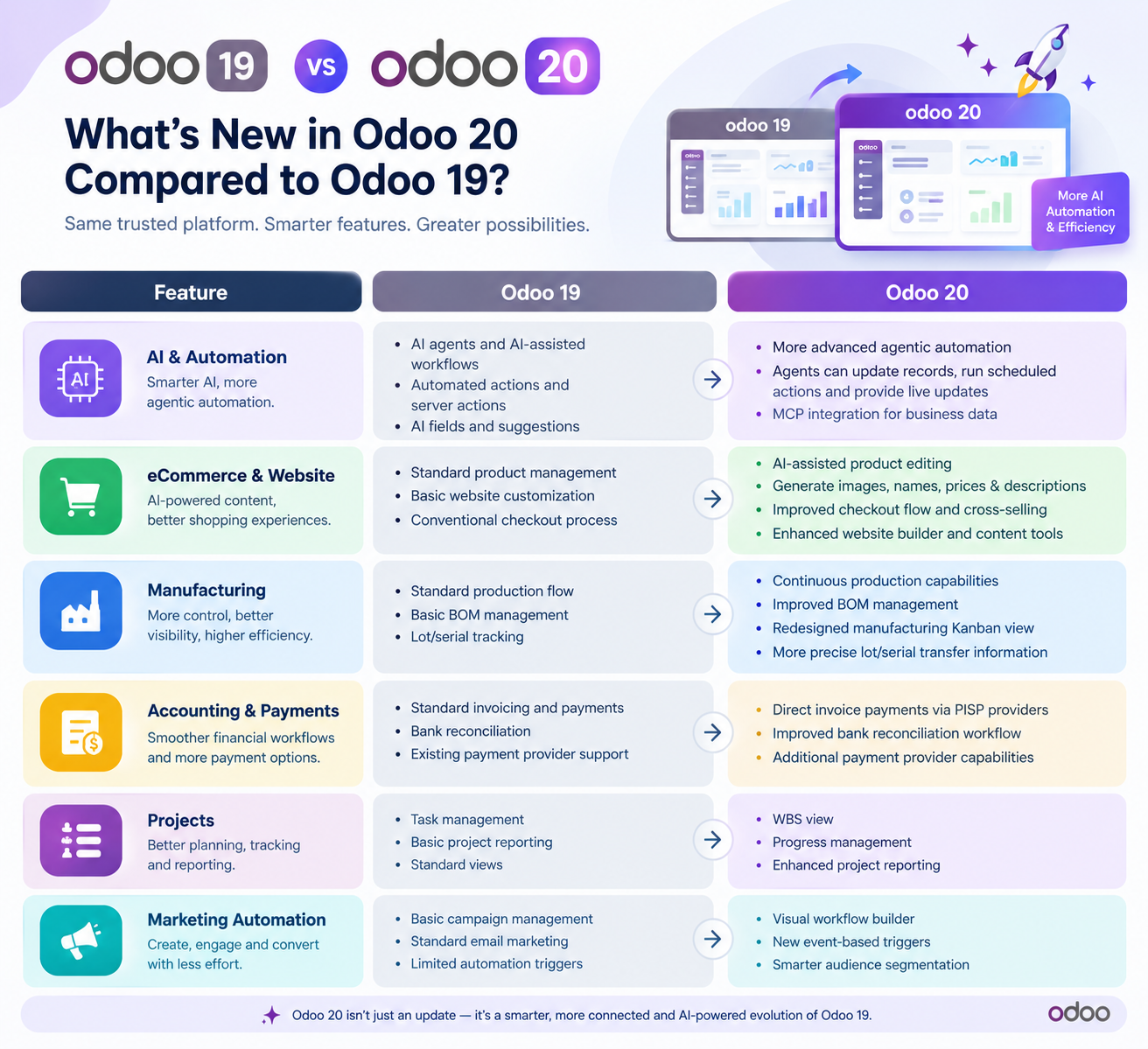
- Odoo 20 is the next step in the evolution of Odoo 19 with big leaps forward in AI, eCommerce, manufacturing, accounting, payments, websites and marketing automation. This is not a change in the way Odoo works but a way to make current workflows smarter, automated and efficient.
- One of the biggest changes is AI and agentic automation; Odoo 20 allows AI agents to modify records, create automatic and scheduled actions, send notifications in real-time on activities, and interact with business data using MCP.
- AI-Assisted Product Editing for eCommerce Odoo 20 The product editing tool also offers AI-assisted product editing. Users can create product images and edit product name, price and description directly from Shop page.
- New Look and Feel for the Manufacturing Kanban View More accurate transfer of information for Manufacturing Lot and Serial Numbers Improved Bill of Materials for Manufacturing
- There are key updates coming for accounting and payments, including direct invoice payments via PISP providers, enhanced bank reconciliation workflows and additional payment provider capabilities.
- AI Website Assistant is a web page and web form builder and editor Marketing Automation provides a visual workflow builder and new event-based triggers for websites and marketing.
- Odoo 20 is mostly an evolution of Odoo 19, with a greater focus on AI-driven assistance, automation, connected workflows and productivity improvements.
Improved user interface
Automation and AI
Advanced Reporting & Analytics
Advantages of Upgrading to Odoo 20
- Improved backend processes for better performance, faster and more responsive.
- Lower odoo costs in the long run = less manual work and better resource allocation.
- Regular updates and security patches to bring the system up to industry norms.
- More custom module flexibility to allow business to tailor odoo enterprise features to unique workflows.
- Latest odoo payment integrations that support more currencies and gateways .
Odoo 20’s approach for specific industries (Real Estate & Aerospace)
Better Real Estate Management
The new property management module provides real estate professionals with automated lease tracking, integrated accounting for rent receipts, and tools to manage maintenance requests. Agents can now easily create professional property listings directly from the CRM, making it easier to present odoo retail listings and attract potential buyers.
Click Here to Explore Real Estate ERP Demo!Aerospace Parts Tracking
Aerospace needs traceability and compliance. With Odoo 20, companies can now track every component from production and installation, to sophisticated lot and serial number tracking. The new quality control module is able to perform automatic inspections and generate audit-ready reports that help companies meet strict regulatory standards.
Check out our Aerospace Traceability guide to see how Odoo can simplify aerospace workflows.
Looking for Odoo 20 for Real Estate or Aerospace Industries?
Schedule a meeting with our expert at your convenience. Choose Your Slot, We'll Handle the Rest.
Book a MeetingOdoo 20 – Basics of Price, Cost and Installation
Odoo 20 Pricing & Plans
How to Install Odoo 20
- Step 1: Create a server with minimum resources (RAM, CPU, Storage)
- Step 2: Download the official Odoo 20 package from the Odoo site or use the Docker image for a faster setup.
- Step 3: Run install script, setup database, create admin account
- Step 4: Navigate to Apps menu and install the modules you require (sales, inventory, accounting etc).
- Step 5: Test the system using sample data before going live with real information.
These steps will help you if you are new to install odoo.
Need help migrating your data? The Odoo ERP Migration App can make your transition easier.
Odoo 20 Solutions & Payments Integrations
Odoo 20 also offers a healthy ecosystem of solutions and payment options beyond the core ERP functionality.
Odoo 20 Business Solutions
Best Odoo Payment Gateway Integration
With the latest odoo payment integrations, online payment has never been easier. Supported gateways include PayPal, Stripe, Authorize.Net, and local providers for targeted markets. The Odoo 20 apps store has these integrations pre-built to reduce configuration time and ensure secure transaction processing.
Looking for best options? For a detailed list see our article on Odoo payment gateway integrations.
FAQ (Frequently Asked Questions)
What is new in Odoo 20 compared to Odoo 19?
Odoo 20 is an evolution of Odoo 19 rather than a redesign. The main upgrades are AI and agentic automation, AI-assisted product editing for eCommerce, a refreshed Manufacturing Kanban view with better lot and serial number handling, improved accounting and payments, an AI website assistant, and a visual marketing automation builder.
Does Odoo 20 include AI features?
Yes. Odoo 20 lets AI agents update records, create automated and scheduled actions, send real-time notifications and interact with business data through MCP. It also adds AI-assisted product editing on the Shop page, an AI website assistant, and AI-powered suggestions that help predict demand and optimize procurement.
What does Odoo 20 offer for real estate businesses?
Odoo 20 includes a property management module with automated lease tracking, integrated accounting for rent receipts and tools for managing maintenance requests. Agents can also create professional property listings directly from the CRM, which makes it easier to present properties and attract potential buyers.
How does Odoo 20 support aerospace traceability?
Odoo 20 lets aerospace companies track every component from production to installation using detailed lot and serial number tracking. The new quality control module can run automatic inspections and generate audit-ready reports, helping companies meet strict regulatory standards.
How much does Odoo 20 cost?
Odoo 20 pricing depends on the number of users, the apps you choose and whether you use cloud hosting or an on-premise deployment. Odoo is offered in Community and Enterprise editions, and many companies find Enterprise delivers better ROI because automation and support reduce overall cost.
What is the difference between Odoo Community and Enterprise?
Odoo comes in two editions: Community and Enterprise. Enterprise adds features, automation and support, which is why many businesses see a stronger return on investment with it. The right choice depends on your user count, required apps and hosting preference.
How do I install Odoo 20?
Create a server with the required resources, download the official Odoo 20 package or use the Docker image, run the install script and set up the database and admin account, install the modules you need from the Apps menu, then test with sample data before going live.
Which payment gateways does Odoo 20 support?
Odoo 20 supports PayPal, Stripe, Authorize.Net and local providers for targeted markets. These integrations are pre-built in the Odoo 20 apps store, which reduces configuration time and supports secure transactions. Odoo 20 also adds direct invoice payments through PISP providers.
Should I upgrade from Odoo 19 to Odoo 20?
Upgrading brings faster backend performance, less manual work, regular security updates, more flexible custom modules and newer payment integrations supporting more currencies and gateways. If you want AI-driven automation and improved reporting, Odoo 20 is a worthwhile upgrade.
Can I build custom dashboards in Odoo 20 without a developer?
Yes. Odoo 20 adds pivot tables, interactive charts and data export to popular formats. Users can build custom KPI dashboards to track performance by department without developer assistance.
How can I migrate my data to Odoo 20?
Start in a sandbox, map your current workflows to Odoo 20 modules, then use the built-in import tools to load customers, products and historical transactions. The Odoo ERP Migration App can also simplify the transition. Train your team and monitor performance after go-live.
How can I book a consultation for Odoo 20 for real estate?
You can schedule a meeting with an Odoo expert at a time that suits you. Choose a slot using the booking button on this page and the team will handle the rest.
Worried about Odoo migrations and afraid of losing your data? Don’t worry! Our Odoo ERP Migration App will handle the migration smoothly and securely.
Odoo Installation and Migration: 20 Tips to Get You Started
- Begin with a sandbox environment to test new features without affecting live data.
- List out your current workflows, to link them to the relevant Odoo 20 modules.
- Use the built-in data import tools to load customers, products and historical transactions.
- Provide training for your team to familiarize them with the new interface and automation features.
- Monitor performance post go-live and set up as required to optimize odoo cost and efficiency.
By complying with these steps, businesses may unlock the full capabilities of Odoo 20 and be prepared for future growth.