Watch Quick Video
POS Quantity Management
Our all-inclusive
POS Quantity Management
simplifies product quantity management in Odoo POS by allowing users to reduce item quantities
instead of deleting the complete order line using the Delete key during checkout. Users can quickly
decrease product quantities step by step, preventing accidental line removal and reducing mistakes during
POS operations. The module works automatically with Odoo POS without extra configuration or dependencies.
With a lightweight design, it improves order accuracy and provides a smoother checkout experience.
POS Quantity Management
- POS, delete key to reduce product quantity: This enables you to quickly reduce the number of items, without having to delete the full order line.
- Change default POS delete behaviour and offer safer quantity adjustment during checkout to reduce accidental deletion of complete order lines.
- Lightweight, easy to install and ready to use immediately, the module does not require any additional configuration or dependency setup.
- Smoothly reduces quantities and minimises mistakes during daily POS operations, improving checkout speed and order management accuracy.
- Works great with the default Odoo POS user interface. Integrates perfectly without impacting the default sales workflow.
Complete Workflow for Manage POS Quantity Management
Install the module and it will automatically update the default POS Delete key behaviour with no additional configuration or setup required. Open the POS interface, add products to the order and use the Delete key on any selected product line to decrease the quantity instead of deleting the complete order line. In case of several quantities of a product, the module reduces the quantity one by one, so that the users can easily manage the order lines while checkout operations. The quantity reduction feature fits right into the standard Odoo POS workflow and helps prevent accidental product removal when processing customer orders. No extra steps or settings are needed, making the entire POS quantity management smooth, faster and more accurate.
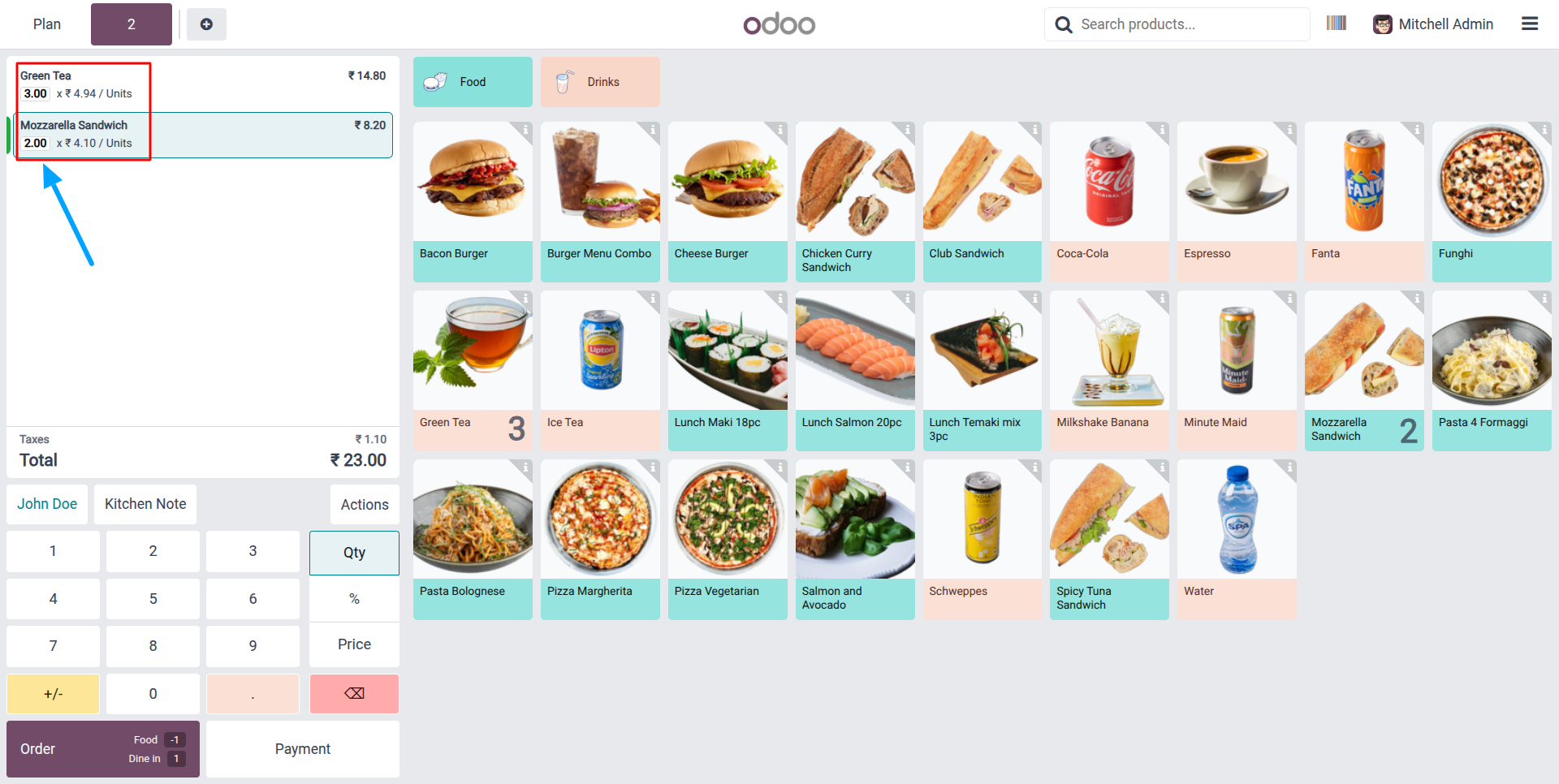
1.Current product quantities are displayed in the POS order line, showing Green Tea quantity as "3 units" and Mozzarella Sandwich quantity as "2 units".
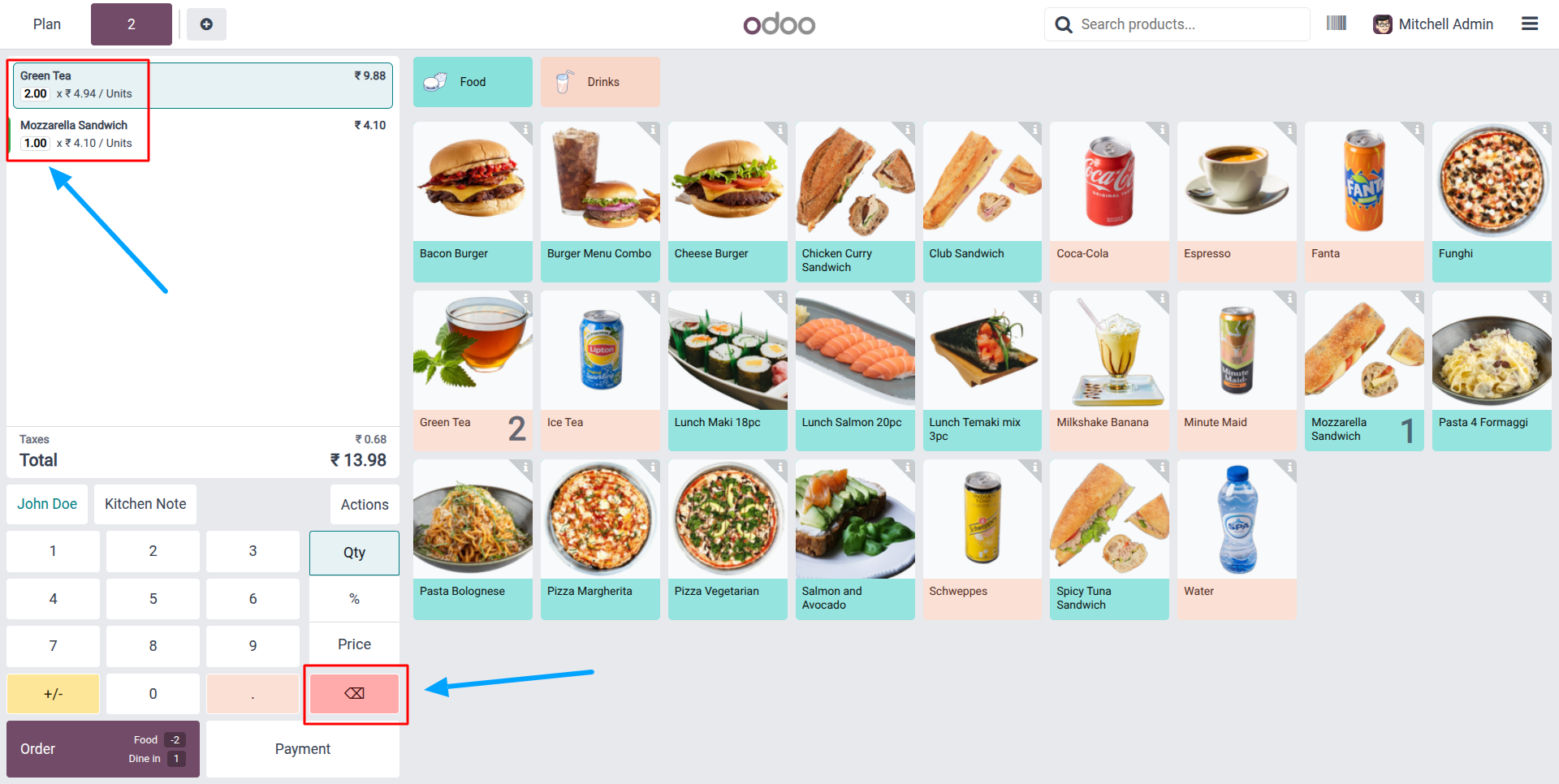
2.Reduce product quantities effortlessly in POS by using the Delete key, allowing users to decrease item counts step by step instead of removing the complete order line.
Our solutions focus on your problems
- Odoo Implementation
- Odoo Customization
- ERP Development and Implementation
- Odoo Ipass Cloud
- AI for Odoo
- Odoo Apps
- Aws Marketplace Products
- Business Engines
Our Pricing includes User Manual, 90 Days Support (Monday-Friday 10am to 7pm IST) and One time Setup
• Works & tested on standard installations of Odoo with no third party apps,
• Free support only for odoo installations with no third party apps,
• Paid support available for Odoo installations with third party apps.

Prefortune is a Odoo Official Partner, Odoo Development company. Our philosophy is to use Open Source tools and technologies to provide cost effective and green solutions for our customers.
Prefortune Technologies LLP is working on web development, Mobile development, and Odoo ERP.
If you need any help or want more additional features, you may contact us through:
Alternative Products
These other products might interest you
Specifications
| Version | 19.0, 18.0, 17.0, 16.0, 15.0, 14.0 |