Watch Quick Video
Website Product Access Control Odoo App
Odoo–Website Product Access Control
is an efficient module that gives better control over the product availability on the Odoo eCommerce
website. This module gives admin ability to control which product, product variant and product category
can be shown to certain customers or website visitors. In the customer form users can create custom
product access, which makes it easier to have different catalogues for different customers. It also allows
businesses to create a dedicated product and category selection for visitors to the public website. Once
the visibility rules are defined, the website will automatically show the correct products according to
the customer's access rules. This solution is particularly well suited for B2B companies, wholesalers,
distributors and companies that require customer specific product catalogues. This ability to control what
products are visible, enables businesses to provide a more relevant, organised and personalised shopping
experience.
Powerful Features to Manage website Product Visibility easily:
1. Personalized Product Access: Admins can assign certain products to certain customers, and
restrict the products that the customers can see on the website. The product mix is easy to adapt for
different customers.
2. Variant-Level Visibility Control: You are able to assign specific products to specific
customers. This is what enables more granularity where some customers might need access to some variants,
but not the whole product
3. Product Category Restriction : Admin can assign some of the product categories to the
customers. This enables customers to purchase products from categories permitted for their account. It
helps the businesses to efficiently manage the different product sets.
4. Visitor Catalog Configuration: Administrators can set the availability of products,
variants or categories for visitors to the website who are not logged in. This means companies have a
manageable catalogue of public products.
5. Customer-Specific Website Catalog: Depending on customers access configuration different
customers may have different product selection. The site displays products relevant to the customer when
the customer logs in, providing a more targeted shopping experience.
6. Automatic Visibility Control: You define the visibility rules you want and the website will
automatically apply them in the eCommerce shop. This reduces manual management and only shows products
available to the customer or visitor.
Website Product Access Control Odoo App
- Enable admins to assign products to customers. After the customer logins the website only the configured products will be available in the shop.
- You will be able to control this more specifically than just assigning the entire product, as the customer will only see the product variants selected after login.
- Depending on the needs of their customers, businesses will be able to create separate product sections or catalogues, so that customers will only see the categories that have been created for them.
- The administrator can create a special catalogue of products for users who are not logged in, so only approved products and categories are visible in the website shop.
- Once visibility is configured, customers and visitors will only see the products, variants and categories they have permission to see. This gives a personalised and controlled eCommerce experience.
Complete Workflow for Website Product Access Control Odoo App
The administrator opens the Customer Configuration and selects the required visibility settings. They can assign specific Products, Product Variants, and Product Categories to individual customers. Administrators can also configure Visitor Product Visibility to control which products are displayed to public website visitors. Once the visibility rules are configured, the website automatically applies the selected Visibility Settings based on the customer or visitor access. This ensures a Personalized Website Catalog and provides customers with only the products relevant to them.
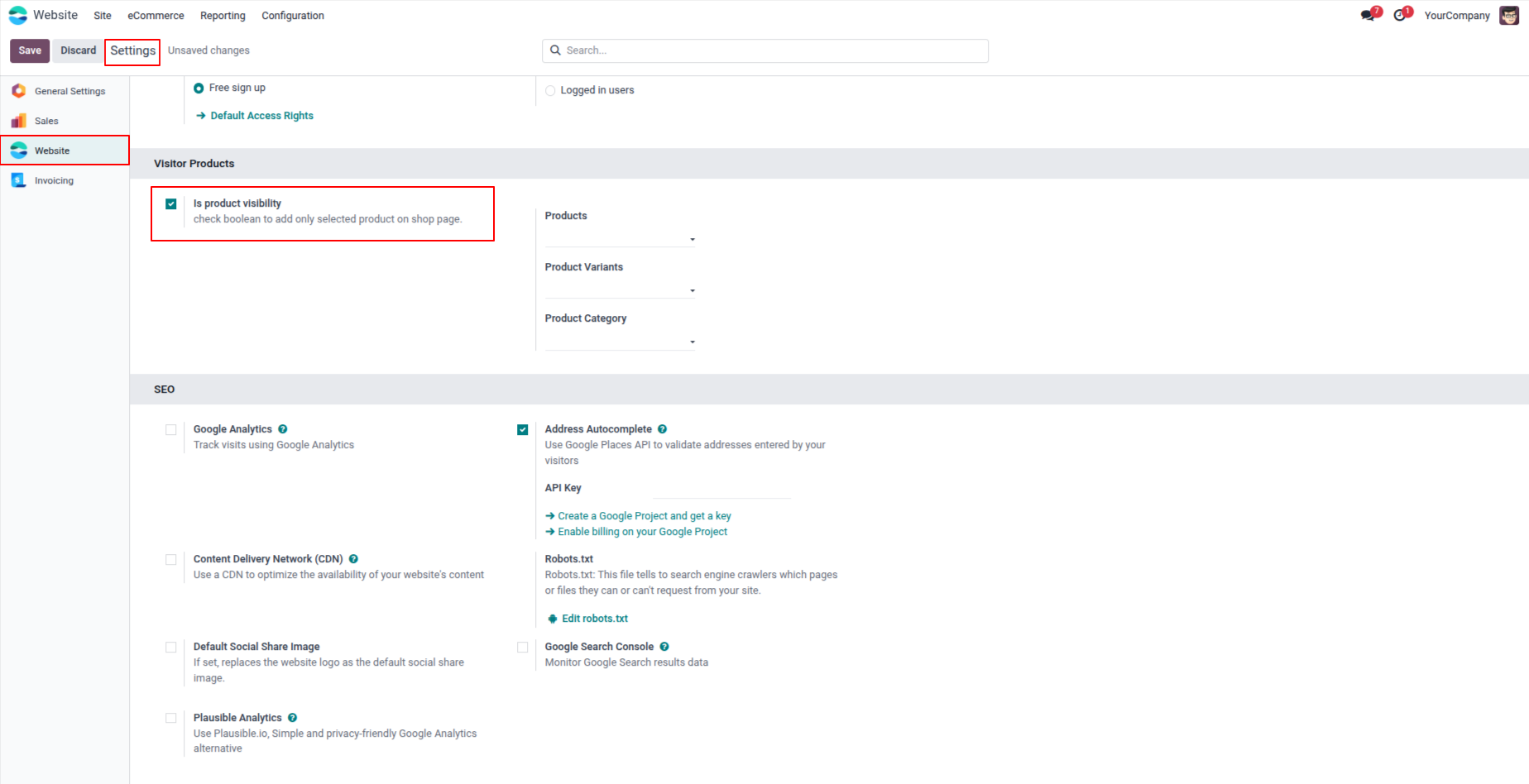
1. Navigate to Website → Configuration → Settings. Under the "Visitor Products" section, enable the "Is product visibility" checkbox to activate the product visibility feature. Once enabled, the Products, Product Variants, and Product Category fields will appear for configuration.
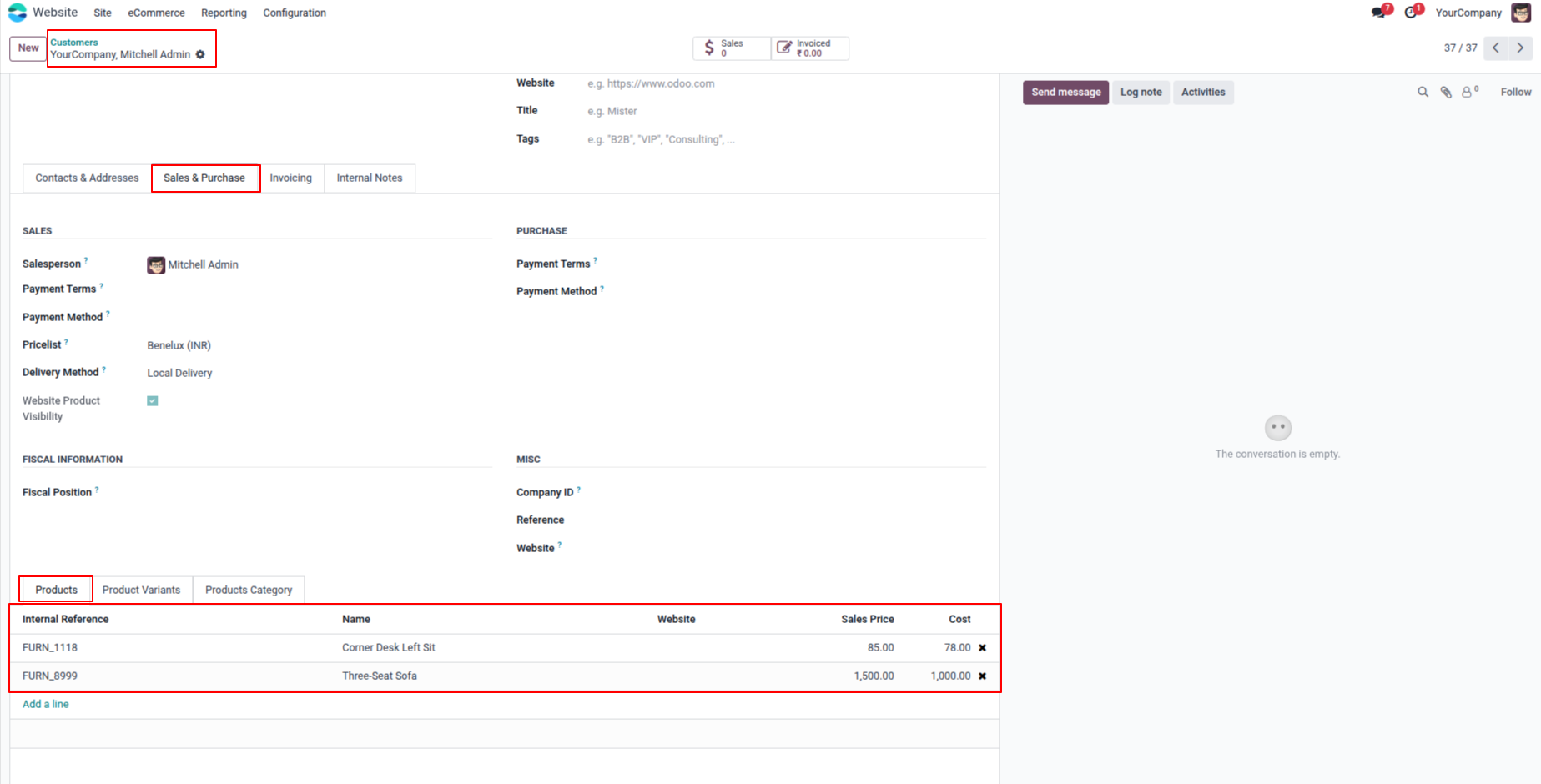
2. Open a Customer record and go to the Sales & purchase tab. Enable "Website Product Visibility" and navigate to the Products tab. Here you can assign specific products that this customer will be allowed to view on the website shop after logging in.
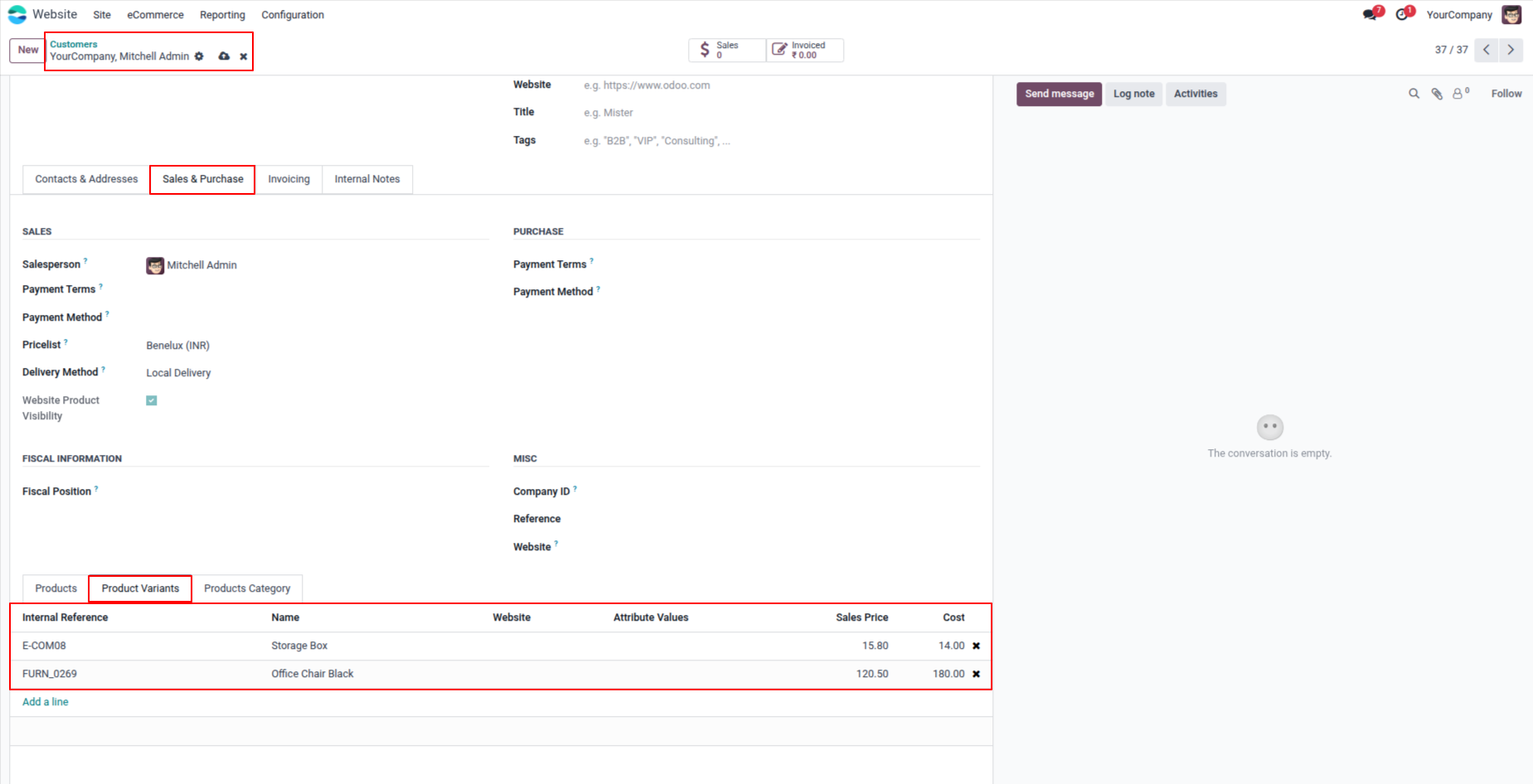
3. Under the Product Variants tab on the customer form, you can assign specific product variants to the customer. Only the selected variants will be visible to this customer on the website, giving precise variant-level visibility control.
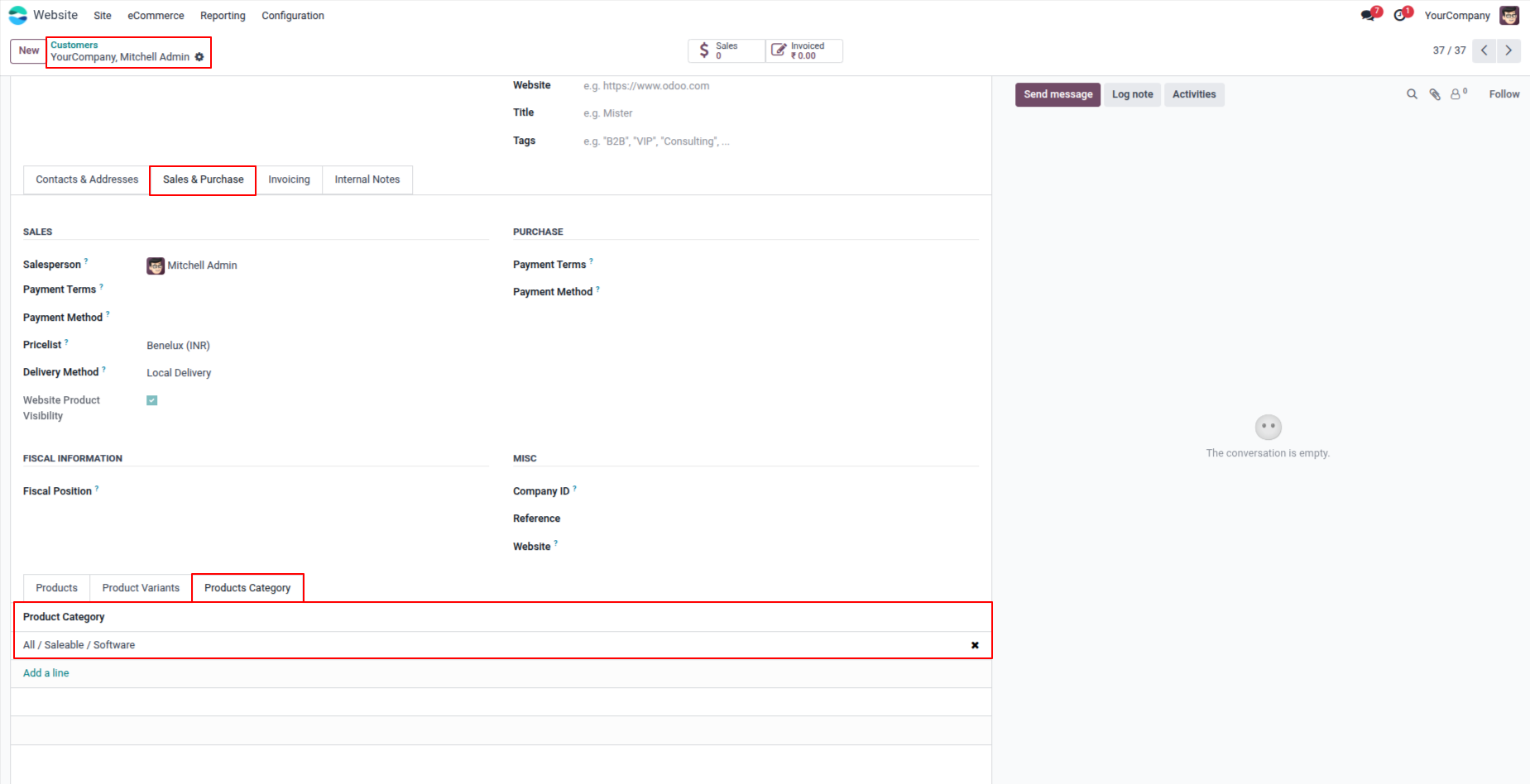
4. Under the Products Category tab on the customer form, assign specific product categories to the customer. The customer will be able to browse and purchase only products belonging to the configured categories after they log in to the website.
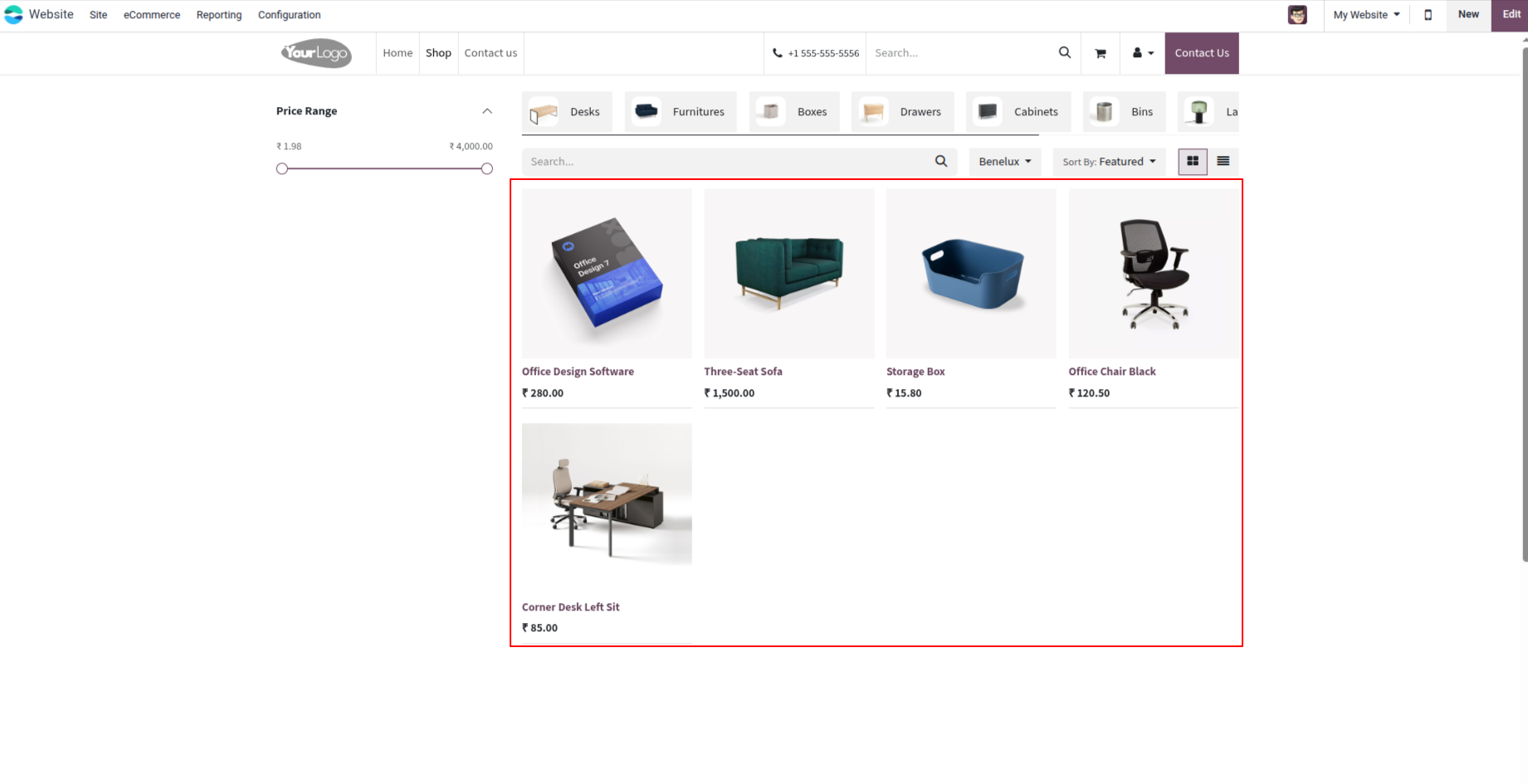
5. When a logged-in customer visits the website shop, only the products, variants, and categories configured specifically for their account are displayed. The shop automatically filters and shows a personalized product catalog relevant to that customer.
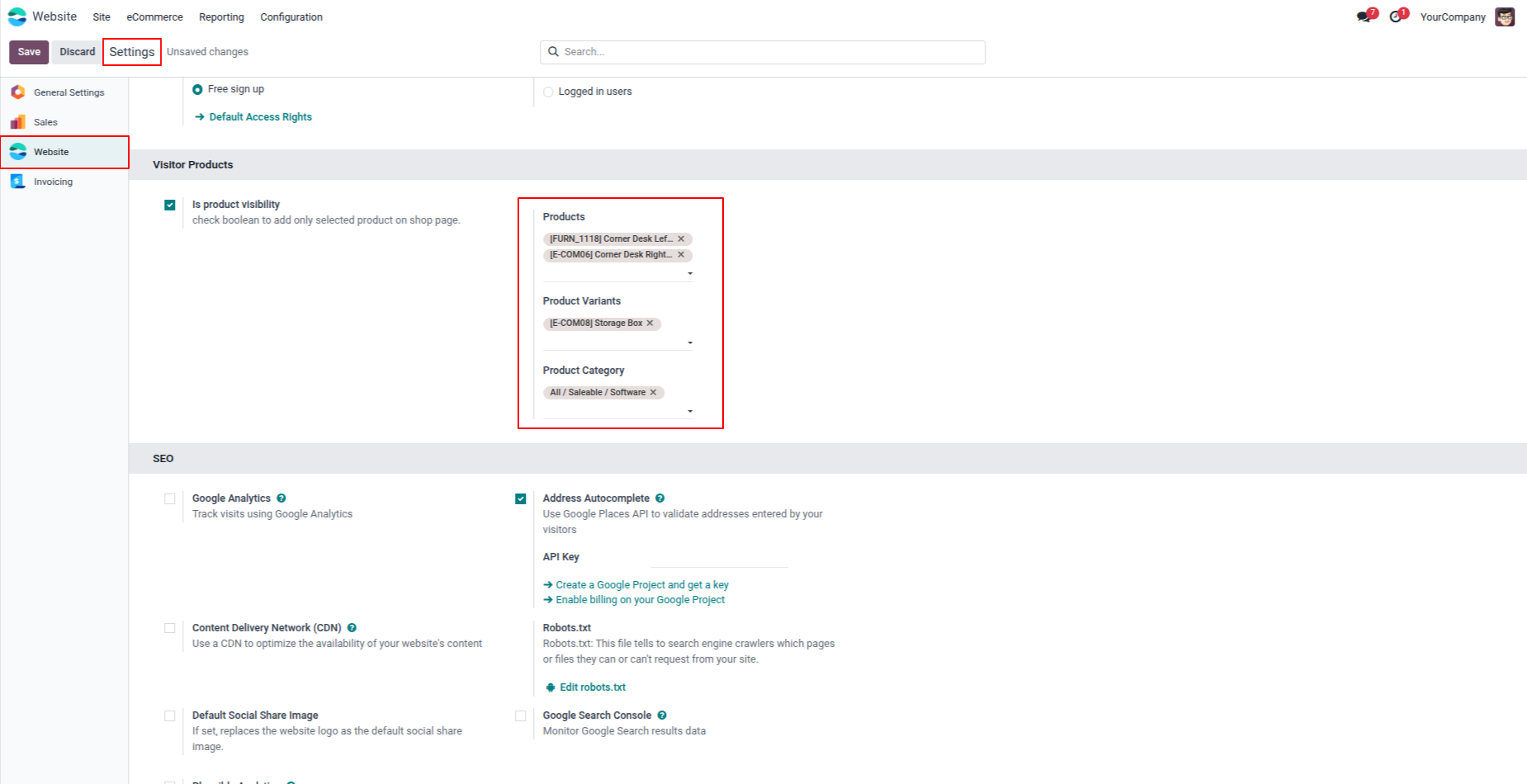
6. In Website Settings , administrators can configure global visibility rules for all website visitors. Select specific Products, Product Variants, and Product Categories to define which items are accessible to visitors who are not logged in or to customers without custom rules.
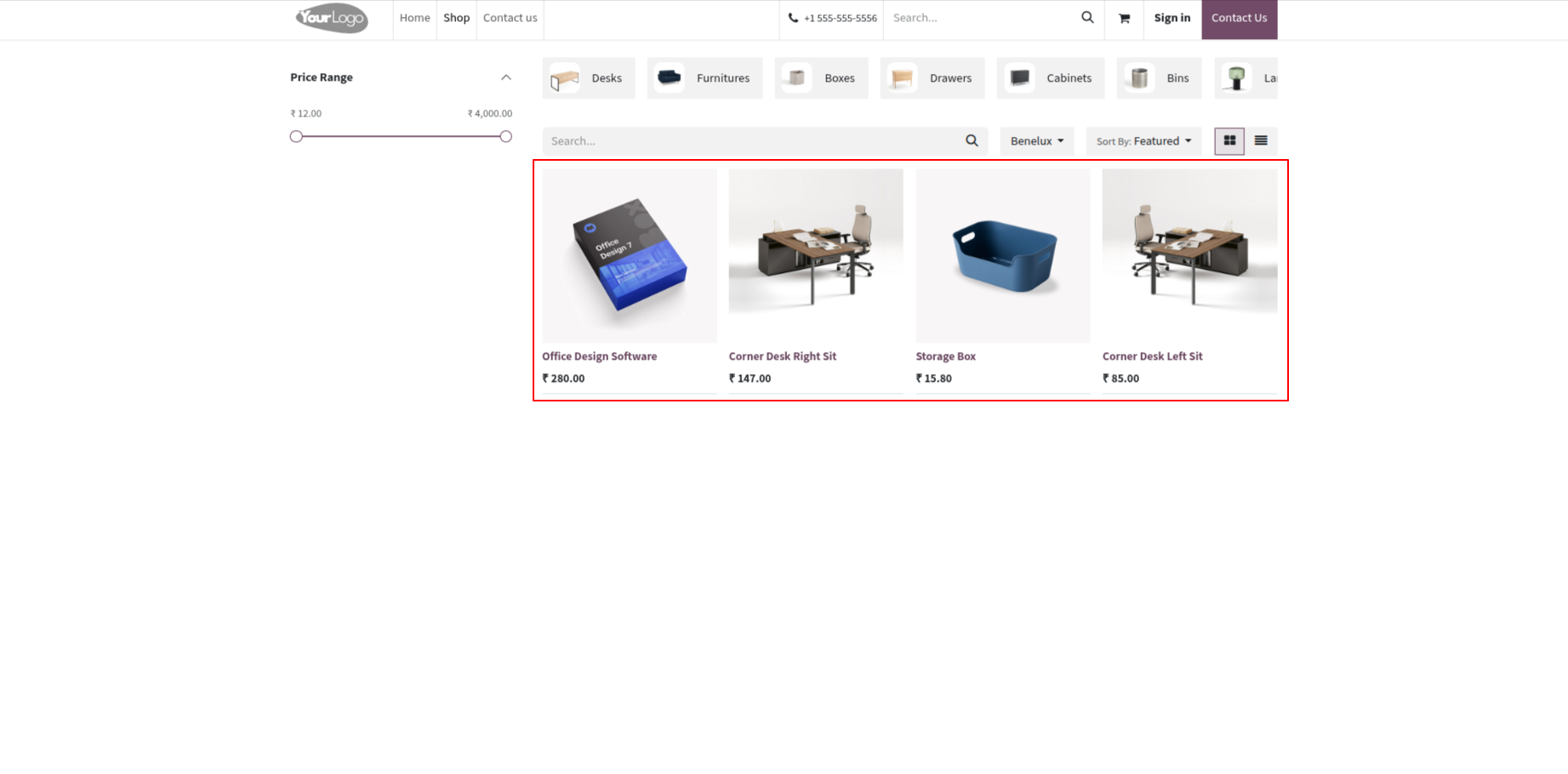
7. Website visitors who are not logged in will only see the products and categories configured in the global Website Settings visibility rules. The website shop automatically applies the configured visibility filters to ensure a controlled public-facing product catalog.
Our solutions focus on your problems
- Odoo Implementation
- Odoo Customization
- ERP Development and Implementation
- Odoo Ipass Cloud
- AI for Odoo
- Odoo Apps
- Aws Marketplace Products
- Business Engines
Our Pricing includes User Manual, 90 Days Support (Monday-Friday 10am to 7pm IST) and One time Setup
• Works & tested on standard installations of Odoo with no third party apps,
• Free support only for odoo installations with no third party apps,
• Paid support available for Odoo installations with third party apps.

Prefortune is a Odoo Official Partner, Odoo Development company. Our philosophy is to use Open Source tools and technologies to provide cost effective and green solutions for our customers.
Prefortune Technologies LLP is working on web development, Mobile development, and Odoo ERP.
If you need any help or want more additional features, you may contact us through:
Alternative Products
These other products might interest you
Specifications
| Version | 19.0, 18.0, 17.0, 16.0, 15.0, 14.0 |